















Table of Contents
- • AppLaunchpad Review Summary
- • About AppLaunchpad
- • Other opinions about AppLaunchpad
- • AppLaunchpad Software Overview
- • AppLaunchpad Review
- • AppLaunchpad Free Plan Review
- • AppLaunchpad Pro Plan Review
- • AppLaunchpad pros & cons
- • Using AppLaunchpad
- • Subscription Details
- • Digital Delivery and Availability
- • Warranty
- • Contact Information for AppLaunchpad Support
- • Where to buy AppLaunchpad?
- • Conclusion of AppLaunchpad reviews & ratings
AppLaunchpad Review Summary
AppLaunchpad is a cloud-based software tool designed to create app store screenshots efficiently, supporting both Apple and Google platforms. It generally provides automated formatting and localization features tailored for app developers and marketing teams, reducing reliance on manual design skills. Its performance often balances ease of use with functional limits, making it a practical choice for standard app screenshot needs.
Highlights
- Suitable for indie developers, startups, marketing teams, and agencies
- Offers customizable templates, device mockups, and AI-powered scaling for multiple app stores
- Free and Pro tiers have usage limits, and payment options exclude PayPal
- Solid overall functionality with a score of 8.0/10 reflecting strengths and trade-offs
Within the broader category of app store optimization tools, alternatives such as manual design with Photoshop remain viable though less automated. For those seeking efficient screenshot creation, this AppLaunchpad review provides balanced insights without promotional bias.
About AppLaunchpad
Creating app store screenshots that fit multiple devices and stores can be complex and time-consuming. Designers often struggle with resizing images to meet varied requirements, leading to frustration and delays. Accurate, appealing visuals are essential for app marketing but difficult to produce without specialized skills.
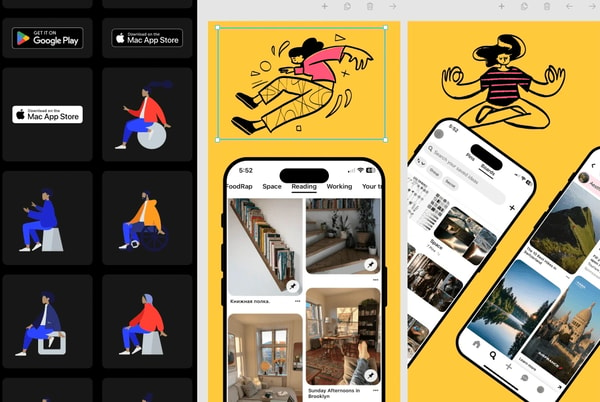
AppLaunchpad is a cloud-based software tool designed to simplify this process. It offers a browser-based platform with ready-made templates, device mockups, and AI-powered features for both Apple App Store and Google Play screenshots. Positioned within app marketing software, it targets developers and teams needing quick, professional visuals without design expertise.
Trusted by over one million users globally, AppLaunchpad supports the latest iOS and Android devices and includes a large library of templates and graphics. It has been adopted by businesses ranging from startups to prominent companies, offering automated resizing, localization, and priority support on paid plans. This traction reflects practical value in fast app screenshot creation.
This tool is best suited for users seeking efficient screenshot production with device-specific formatting. However, limitations include project caps on paid plans and restricted payment options, which may affect some users. For a detailed assessment, see the AppLaunchpad review that covers capabilities and trade-offs.
AppLaunchpad Software Overview
AppLaunchpad is a browser-based software platform designed for creating app store screenshots for iOS and Android devices. Originating as a tool developed by Obvair Labs, it serves app developers, marketing teams, and agencies by streamlining the creation of professional visuals for app listings. The platform operates globally with a subscription-based model that includes free and paid tiers.
AppLaunchpad's operational model is cloud-based, featuring a drag-and-drop editor equipped with ready-made templates, device mockups including the latest iPhone and iPad models, and AI-driven features for scaling and localization. The platform supports automated resizing and formatting tailored to the requirements of both the Apple App Store and Google Play store, facilitating efficient app marketing processes. It is used by over one million users worldwide and integrates a large library of graphics and fonts.
The product scope includes screenshot generators for multiple devices, app icon creators, and support for localized screenshots enhancing global reach. While suitable for indie developers and startups, the service imposes limitations on free and Pro subscription plans, especially regarding project counts and payment options. The AppLaunchpad Review highlights its functionality and ease of use within the app store optimization category, contributing to app marketing workflows without requiring advanced design skills.
AppLaunchpad Review
AppLaunchpad is a cloud-based brand focused on simplifying the creation of app store screenshots tailored for both Apple App Store and Google Play. It enables users to produce professional visuals through an easy-to-use online platform that emphasizes device-specific formatting and automation. The brand serves app developers, marketing teams, and agencies aiming for efficient app store optimization.
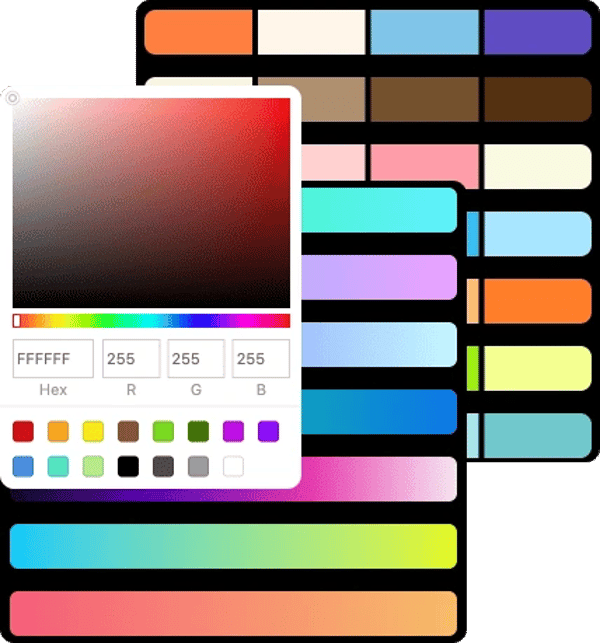
The platform offers a subscription service with free and paid tiers, featuring ready-made templates, device mockups for the latest iOS and Android models, and AI-powered tools for scaling and localization. Its web-based editor includes drag-and-drop functionality alongside a large library of graphics and fonts. AppLaunchpad positions itself as a time-saving alternative to manual design workflows, supporting global markets with multi-language capabilities.
AppLaunchpad Highlights- Supports latest iOS and Android devices
- AI-driven screenshot scaling and localization
- Free and Pro subscription options
- Extensive template and asset library
- Over 1 million global users
AppLaunchpad Free Plan Review
The Free Plan is designed for new or occasional app developers who need basic app store screenshot creation. It includes a drag-and-drop editor with limited access to fonts, graphics, and templates.
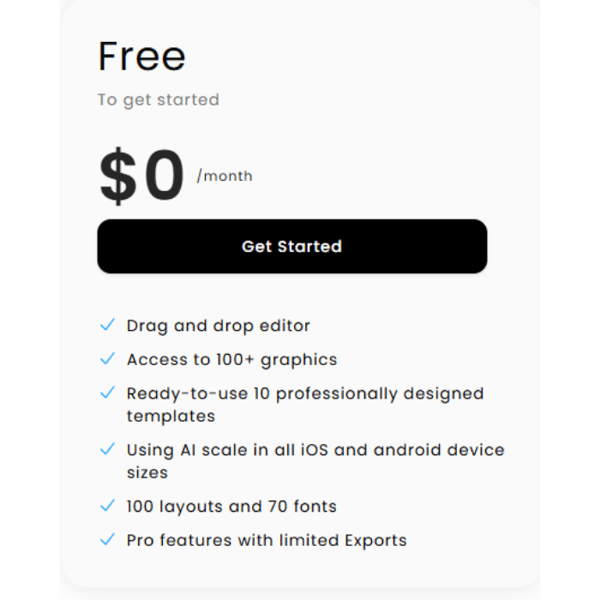
This plan allows users to create simple visuals without requiring design experience but has restrictions on exports and available assets. It supports entry-level functionality suitable for straightforward projects.
Features include more than 100 graphics, 10 ready-to-use templates, 100 layouts, and 70 fonts. This plan is offered at no cost through the official website, providing basic capabilities to start app screenshot design.
Check Price • theapplaunchpad.com
AppLaunchpad Pro Plan Review
The Pro Plan is designed for indie developers, startups, marketing teams, and agencies who need to produce professional app screenshots regularly. It includes features such as unlimited exports and access to a large library of assets.
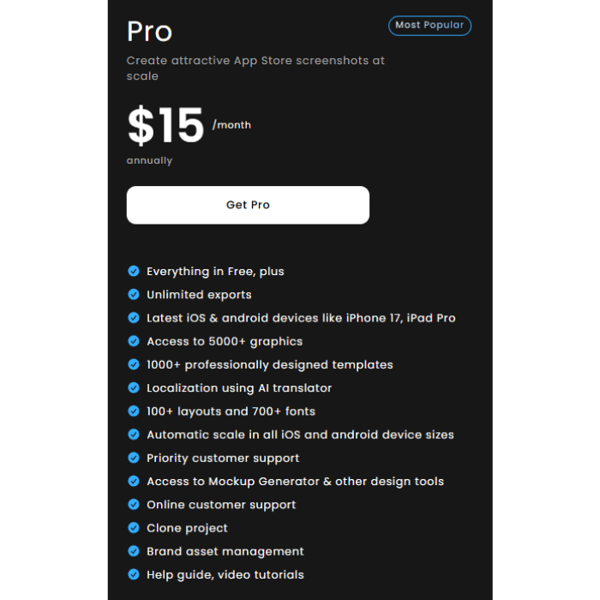
This subscription level offers AI-driven localization and priority support while ensuring compatibility with the latest iPhones and iPads. It meets the requirements for app stores with up-to-date device support.
Key features include over 5000 graphics, more than 1000 templates, localization tools, and brand asset management. The plan is priced at $15 per month and is available through the official website.
Price $15 • theapplaunchpad.com
AppLaunchpad pros & cons
AppLaunchpad supports the latest iOS and Android devices, including the iPhone 17 series, making it suitable for producing up-to-date app screenshots. Its automation features for screenshot sizing and localization help save time and reduce manual design effort, while the drag-and-drop editor and ready-made templates simplify the creation process for users without design experience.
However, the free plan imposes limits on fonts, graphics, layouts, and device options that may restrict more advanced needs. The Pro plan limits users to 100 projects, requiring an Enterprise plan for larger volumes. Additionally, payment options do not include PayPal or prepaid cards, and there is no availability for offline purchases or physical store sales.
- • Supports latest iOS and Android devices
- • Automation of screenshot sizing and localization
- • Flexible subscription management
- • Ready-made templates and assets
- • AI-driven productivity features
- • User-friendly drag-and-drop editor
- • Trusted by over 1 million users
- • Free plan limitations on resources
- • Project limit on Pro plan
- • No PayPal or prepaid card options
- • No offline or physical store availability
Using AppLaunchpad
AppLaunchpad is a cloud-based editor accessed through a web browser, eliminating the need for installing design software or advanced skills. Users begin by selecting templates or device mockups appropriate for popular app stores. The platform includes a drag-and-drop interface with over 700 fonts and more than 100 graphics, allowing quick customization of screenshots, backgrounds, and icons for multiple devices at once.
Key features include automated resizing for Apple and Google Play stores, AI-powered localized screenshot generation for various regions, project cloning, and template reuse. It supports the latest devices such as the iPhone 17 series and iPad models. This efficient process reduces time spent on formatting and improves marketing visuals, particularly for teams with limited design resources.
Subscription Details
AppLaunchpad provides a subscription model with free and paid tiers tailored to different user needs. The free tier offers basic access with limits on available assets and export options, while the Pro tier includes expanded features and priority support. Users can manage their subscriptions online with monthly or annual billing cycles.
Subscription features include: flexible plan changes at any time, access to large asset libraries on the Pro plan, automated compliance with device and store requirements, and AI-powered localization tools. This model supports users as they scale their project volume and adapt to their level of expertise.
Digital Delivery and Availability
The service is available globally as a digital platform accessible via the web.
Users receive instant access to the platform immediately after subscription purchase. There are no physical products, shipping carriers, or offline purchase options involved. Delivery is cloud-based and does not involve tracking or shipping costs.
Warranty
The provider does not specify any particular warranty coverage for the service. Users should note that no explicit guarantees are offered related to product performance or outcomes. The service is delivered as a digital subscription without additional warranty assurances.
There are no warranties or guarantees beyond access granted through the subscription. Standard terms of digital service usage apply, which may limit provider liability. Customers are advised to review the terms of service for detailed conditions governing the subscription.
Contact Information for AppLaunchpad Support
Users can reach AppLaunchpad support primarily through email and an online help desk platform. Direct phone support and live chat are not available according to the provided data.
- Email: [email protected]
- Help Desk: https://intercom.help/theapplaunchpad
If you need assistance with orders, billing, or technical issues, contacting support via email or using the help desk is recommended. These methods provide practical options for receiving help, although real-time support channels are not offered.
Where to buy AppLaunchpad?
Users can officially access AppLaunchpad exclusively through their website, where the secure account system allows for straightforward subscription management and offers reliable customer support; clear policies enable flexible cancellations or plan changes. Purchasing via the official site, including theapplaunchpad.com, means immediate digital access to the service, while the absence of offline stores means variations in experience and service options compared to traditional retail. This direct approach ensures consistency, though marketplace alternatives might differ in terms of reliability and policy clarity.
Conclusion of AppLaunchpad reviews & ratings
AppLaunchpad plays a significant role among app development tools by simplifying the creation of app store screenshots with automated formatting and support for the latest devices. Its cloud-based platform, accessible through theapplaunchpad.com, offers user-friendly templates and localization features that suit a broad range of creators. These strengths help reduce manual work and ensure visuals meet store requirements efficiently.
Users interested in app screenshot tools may find value in exploring more details within the AppLaunchpad review to assess how the platform fits their needs. This review serves as a reliable reference for revisiting the product’s capabilities and considering its applicability without pressure or commitment.
Editorial notes reflect aggregated buyer feedback and our independent editorial review of publicly available information. They are for informational purposes only and do not constitute endorsements. Purchases are made at your own discretion, and we are not responsible for transactions or outcomes related to this store. Experiences may vary. This content is assisted by AI and reviewed by our editorial team. While we strive for accuracy, AI-supported information may not always be 100% precise, so please verify any critical details.

